Can I keep my existing fax number?
Yes. If you already publish a fax number, you can move it to FaxTerra instead of handing out a new one. Transferring a number in is free on every paid plan, and you can find out whether your number can move before you pay anything.
What it costs
Bringing a number in is free on every paid plan. There is no transfer fee, and nothing is charged for the move itself.
A number you bring in occupies a line on your plan the same way a number you picked would. Every paid plan includes one line, so if yours is still empty the transfer costs nothing beyond the plan you already pay for. If your line is already in use, the wizard offers to add a paid extra line first, at $3.99 a month or $39.99 a year on annual billing, and states the cost before you agree to it.
Transfers cover US and Canada local numbers.
Check your number before you pay
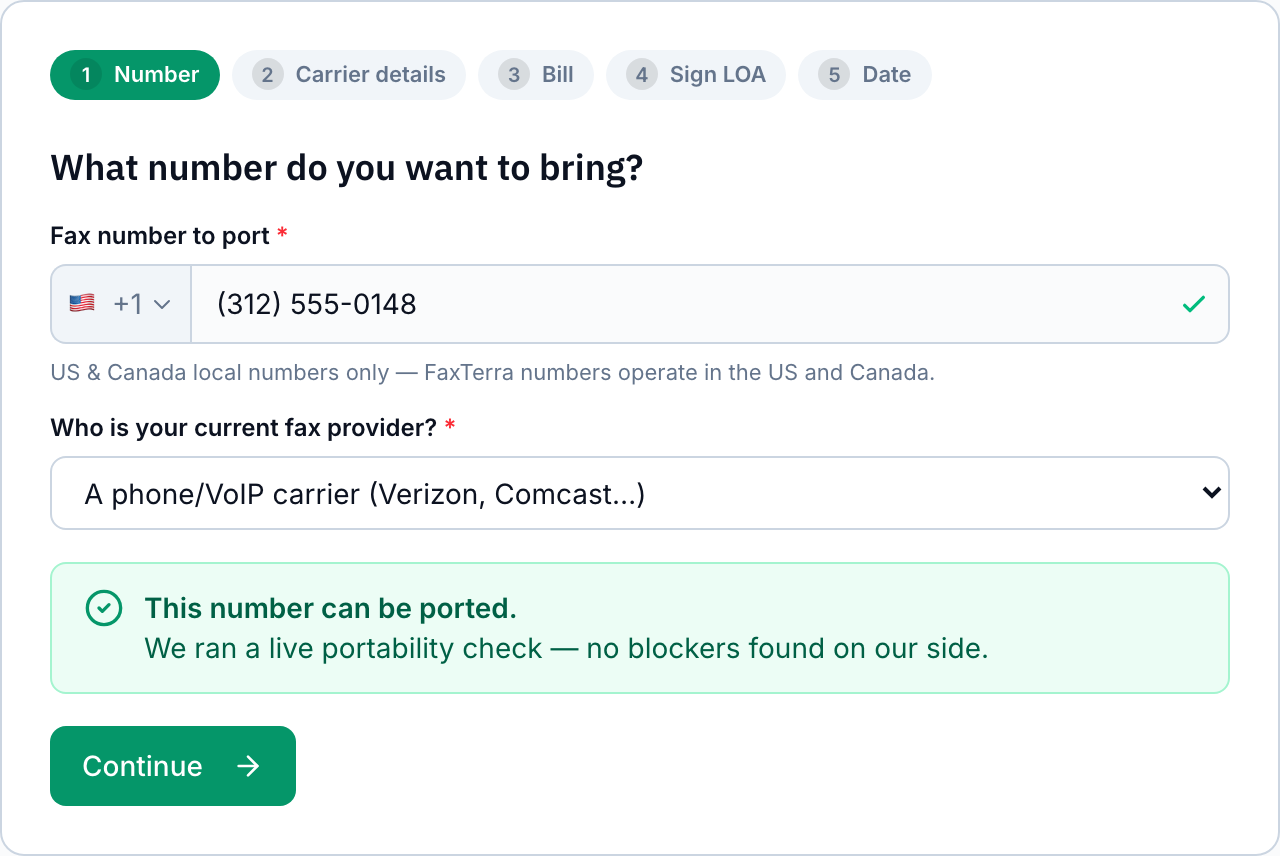
Whether a number can move is the question worth answering first, and you do not need a plan or an account to answer it. The same check runs without signing in on the porting guide. Signed in, open your fax numbers page and choose Port an existing number; that version saves your result for when you start the transfer. Either way, enter the number and name who provides it today, and the check answers in seconds.
The check creates no order and commits you to nothing. It tells you what it found either way: that the number looks clear to move, that we could not confirm it, or that your current provider is one that commonly holds on to the numbers it issues. Starting the transfer itself needs a paid plan, because the number needs an account to arrive on, and your check is saved so you can pick up where you left off once you subscribe.
What to have ready
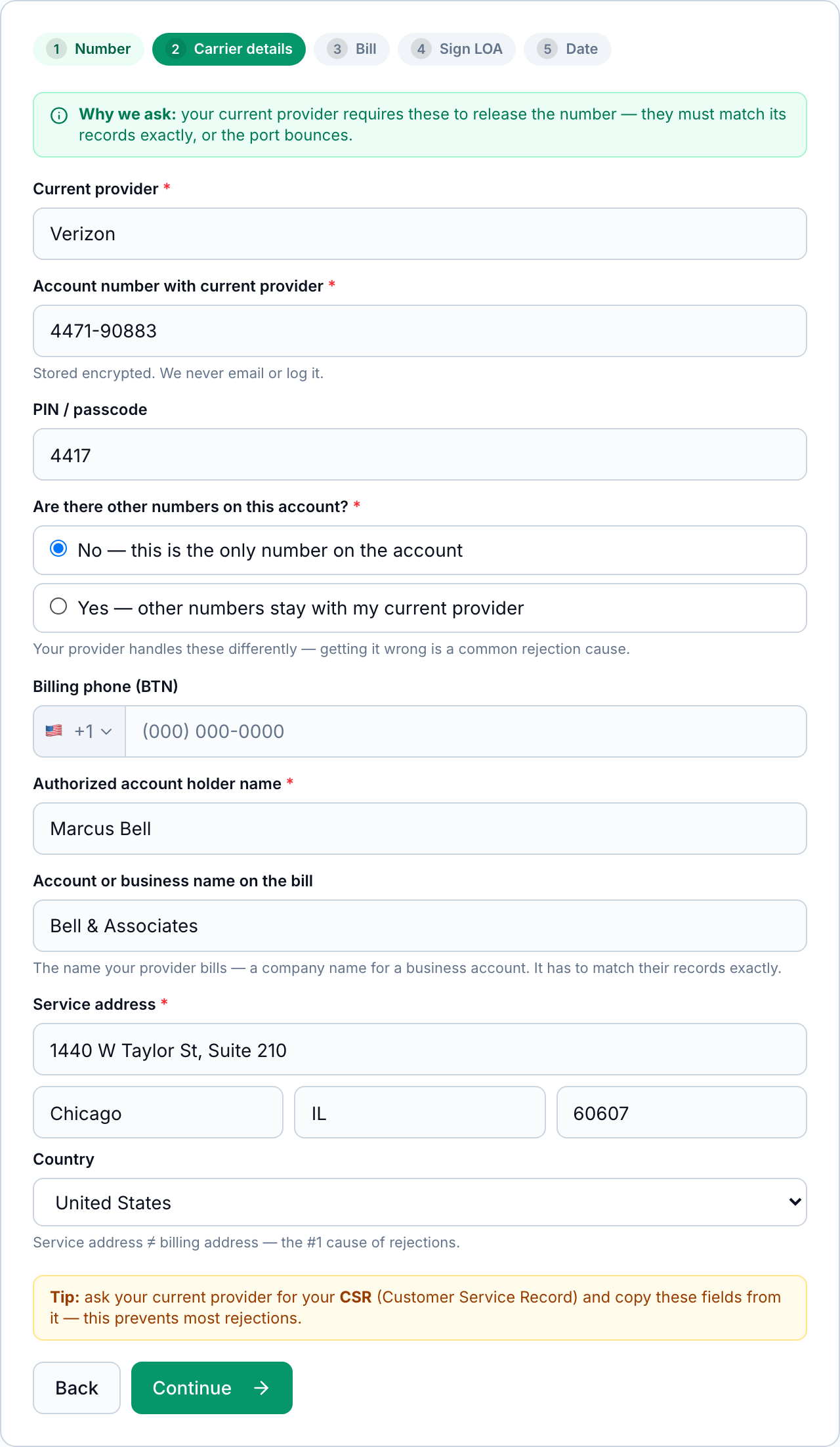
Your current provider releases the number, so the details you give have to match what that provider holds on file. Collect these from your account with them before you start:
- The account number, and the PIN or passcode if the account has one
- The name of the authorized account holder, spelled as it appears on the account
- The business or account name your provider bills, if the account is not in your own name
- The service address on the account, which is often not the same as the billing address
- A recent bill, as a PDF or a photo (providers commonly refuse one more than a month old)
- Whether other numbers stay behind on that account, or the number you are moving is the only one on it
The fastest way to get all of it right is to ask your current provider for your Customer Service Record and copy the fields from that. A service address that does not match is the most common reason a transfer is rejected, and a bill more than a month old is the second.
The five steps
The wizard walks through five steps and saves as you go, so you can stop after any of them and come back.
- Your number. Enter the number and say who provides it today. This is where the portability check runs.
- Account details. The account number, PIN, account holder, and service address held by your current provider.
- A recent bill. Your provider matches it against its own records to confirm you hold the account.
- Your signature. You sign a Letter of Authorization, the document that authorizes FaxTerra to request the number on your behalf. You draw the signature and give your legal name; the signature is recorded with your name, address, and the time you signed.
- A date. You choose when you would like the number to move. Your current provider sets the date that actually applies and we confirm it to you by email.
After you submit, the status page shows where the transfer has got to, and we email you at each change. If your provider comes back asking for a correction, that page names the field to fix and lets you resubmit without starting again.
How long it takes, and what happens to your old service
Your current provider drives the schedule, so a transfer takes from about a business day to a few weeks depending on who holds the number and how quickly they respond. Business numbers and accounts with several numbers on them tend to take longer than a single personal line.
Your existing fax service keeps working the whole time. The number only stops answering at your old provider at the moment it starts answering at FaxTerra, so there is no window where faxes to it go nowhere. Keep your old service active until the transfer completes: cancelling it early is one of the most common ways a transfer fails, because the number can be released back to the phone network before it can be moved.
Once the number is live, faxes to it arrive in your FaxTerra inbox and you can cancel your old service.
When a provider holds on to a number
Not every number will move, and the reason is usually the provider you are leaving. Some services treat a number they issued you as theirs rather than yours, and will refuse to release it or ask for a fee to consider it. A number you originally brought to that provider yourself will usually move without difficulty; one they handed you at signup often will not.
The check tells you this up front, when you name your current provider, and before you have paid anything. If your number turns out to be one that will not move, the same screen offers you a FaxTerra number instead, which is live in seconds. If you would rather try anyway, you can: your provider may refuse, and we do not charge you for an attempt that fails.
Which providers release numbers
Three groups cover most of the providers people leave.
Completed transfers: Nextiva. We have moved a number from there to FaxTerra end to end.
Routine transfers: carrier-backed phone and online-fax services whose published terms do not restrict moving your number (RingCentral, Ooma, Vonage, 8x8, Grasshopper, Dialpad, Phone.com, Google Voice, SRFax, FAXAGE, iFax, Fax.Plus, HelloFax, Sfax, mFax), and regulated phone companies, which number-portability rules oblige to release a number you hold (AT&T, Verizon, Spectrum, Comcast / Xfinity, Frontier, Lumen / CenturyLink, Cox, Bell Canada, Rogers, Telus).
Restricted by their own terms: eFax, MyFax, MetroFax, Send2Fax, TrustFax, RapidFax, eVoice. eFax's customer agreement restricts transferring numbers it assigned you, and the services sold alongside it are treated the same way here until a transfer proves otherwise. A number you brought to one of them can usually still move; a number they gave you often cannot.
The list grows as transfers complete. A provider that is not on it is not ruled out: the check runs a live lookup on the number itself.
The number stays yours
A number you brought in is treated as yours for as long as you hold it and after you stop. If your plan ends, a number you transferred in is not released the way a FaxTerra-assigned number is: it is held for 60 days so you can move it to another provider, and we never charge a fee to let it go.
Even after that window, nothing releases it automatically. A person reviews the number first, so a number you brought with you is not destroyed by a timer. If you want to move it elsewhere, tell your new provider you are transferring a number away from FaxTerra and they will start the request; we cooperate with it.
Frequently Asked Questions
Does it cost anything to bring my number to FaxTerra?
No. Transferring a number in is free on every paid plan, and there is no fee to move it back out later. The only cost that can arise is an extra line: a transferred number takes a line on your plan, so if the line your plan includes is already in use, the wizard adds a paid extra line at $3.99 a month and tells you before you agree.
Can I find out whether my number can move before I subscribe?
Yes. The portability check is open to any signed-in account on any plan, including the free one. It creates no order and costs nothing. Starting the transfer itself needs a paid plan, because the number needs an account to arrive on, and your check is saved for when you come back.
Can I bring my number from eFax?
It depends on where the number came from. eFax's customer agreement names eFax the customer of record for numbers it assigns and restricts transferring them, so a number eFax gave you usually cannot move. A number you originally brought to eFax can be ported out after you terminate, provided you give written notice within thirty (30) days of termination and pay eFax's $40 per-number administrative fee. Run the check first; if the number cannot move, a new FaxTerra number is live in seconds and you can publish it while keeping eFax until you are ready to close it. The porting guide has eFax's terms in full.
Can I bring a mobile, VoIP, or internet phone number?
There is no rule that rules a number out for being mobile, VoIP, or internet-based. What decides it is whether the provider holding the number will release it, which is why the check is worth running first: it is a live lookup and it reports what it finds, either that the number looks clear to move or that we could not confirm it. Neither answer is a promise, because your current provider has the final say. The firm limit is the kind of number rather than the kind of line: US and Canada local numbers transfer in, and toll-free numbers do not.
How long does a fax number transfer take?
From about a business day to a few weeks. Your current provider sets the pace, and accounts with several numbers on them take longer than a single line. Your existing service keeps working until the moment the number switches over.
Will I miss faxes while my number transfers?
No. The number answers at your current provider right up until it starts answering at FaxTerra, so there is no gap. Keep your old service active until the transfer completes: cancelling early is one of the most common causes of a failed transfer.
Can I transfer a toll-free fax number?
No. Transfers cover US and Canada local numbers. Toll-free numbers (800, 833, 844, 855, 866, 877, and 888) cannot be brought in, and toll-free numbers are not offered as FaxTerra receiving numbers either.
Can I bring a number to a 90-day number purchase?
No. The 90-day number is a time-boxed product whose number is released when the window ends, so a number you brought with you could not be kept on it. Transfers are available on the subscription plans, including all three Healthcare tiers.
What if my current provider refuses to release the number?
Some providers hold on to numbers they issued. The check flags this when you name your provider, before you have paid anything, and offers you a FaxTerra number instead. You can also attempt the transfer anyway; if your provider refuses, we do not charge you for the attempt.
My transfer came back rejected. What now?
A rejection almost always means one detail did not match your current provider’s records, most often the service address. The status page names the field to correct and lets you resubmit without starting the wizard again. Asking your current provider for your Customer Service Record and copying the fields from it prevents most rejections.
Can I take my number away from FaxTerra later?
Yes, and there is no fee. Ask your new provider to start the transfer and we cooperate with it. If your plan has already ended, a number you originally brought in is held for 60 days so you have time to move it, and it is not released automatically even after that. The full policy, including numbers FaxTerra assigned you, is on taking your number with you.
Do I need to cancel my old fax service first?
No, and you should not. Keep it active until the transfer completes. The number has to still be live on that account for your provider to hand it over, so cancelling first is one of the most reliable ways to make a transfer fail.