Your Whole Business on One Fax Account
A real fax number, the inbox behind it, and everyone who needs it, on one account. Put as many people on it as you like at no extra cost, add a second number for a second department, and pay only for the pages you send. Starts at $4.99 a month, cancel anytime.
Free
As many as you like, on every plan including Free. No per-user fee, and no team plan to convert to.
$3.99/mo each
One included on every paid plan. Extras are an add-on on the same invoice, receiving into the same inbox.
$4.99 to $29.99
The only thing the tiers differ on: 50, 200, or 1,000 pages a month.
Why businesses fax
Banks, courts, government agencies, and insurance companies still require it. Having a fax number means you can work with any of them.
Professional credibility
Clients, partners, and vendors expect a fax number. It signals that your business is established and reachable through every channel.
Government forms
State filings, IRS forms, permit applications, and license renewals often require or accept fax, and a faxed filing comes with a delivery confirmation you can keep.
Inbound documents
Clients and institutions can fax you contracts, signed documents, and records. You are notified by email (and by push with the mobile app), then view or download them as PDFs from your inbox.
Lower cost
A physical fax machine needs a phone line ($30 to $50 a month), toner, paper, and maintenance. FaxTerra starts at $4.99 a month with nothing else to buy.
Your fax inbox
When someone faxes your number, it shows up here, and you get an email notification. View, download, or forward from any device.
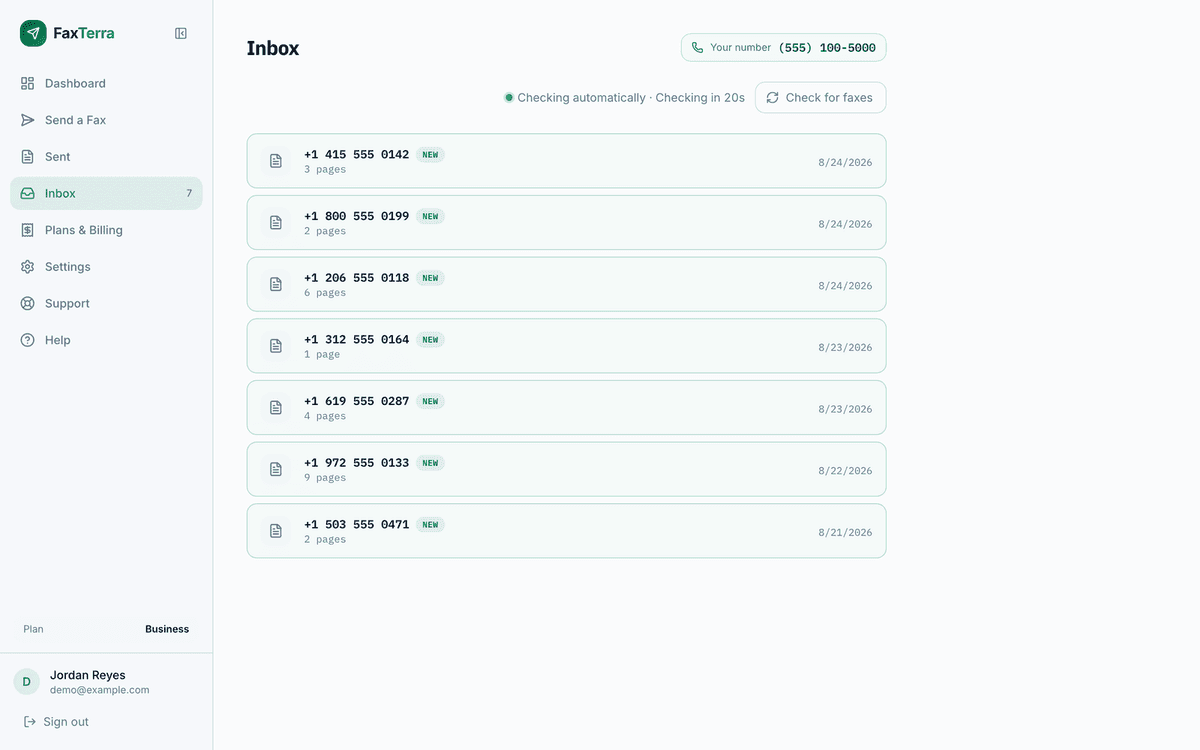
The screenshot walkthrough shows the rest of the flow, and downloads as a PDF you can hand to whoever signs off.
Shared accounts
The account holds the number, the inbox, the sent history, and the monthly pages. Everyone you invite works inside it, signed in as themselves. There is no per-user fee and no team plan to upgrade to: your account becomes a team the moment you invite someone, on every plan including Free.
Shared inbox and history
A fax that arrives for the office is in the inbox for everyone on the account, and anything anyone sends is in the shared history. The record belongs to the business, not to whoever clicked send.
Invite by email
Add colleagues from Settings and they get a link good for seven days. An invite nobody answers expires on its own, so there is nothing to clean up.
Keep your own account
Joining the office account changes nothing about a person's own FaxTerra account. Anyone on more than one switches between them from the sidebar, and a number set up under one account can be moved to the account that should own it.
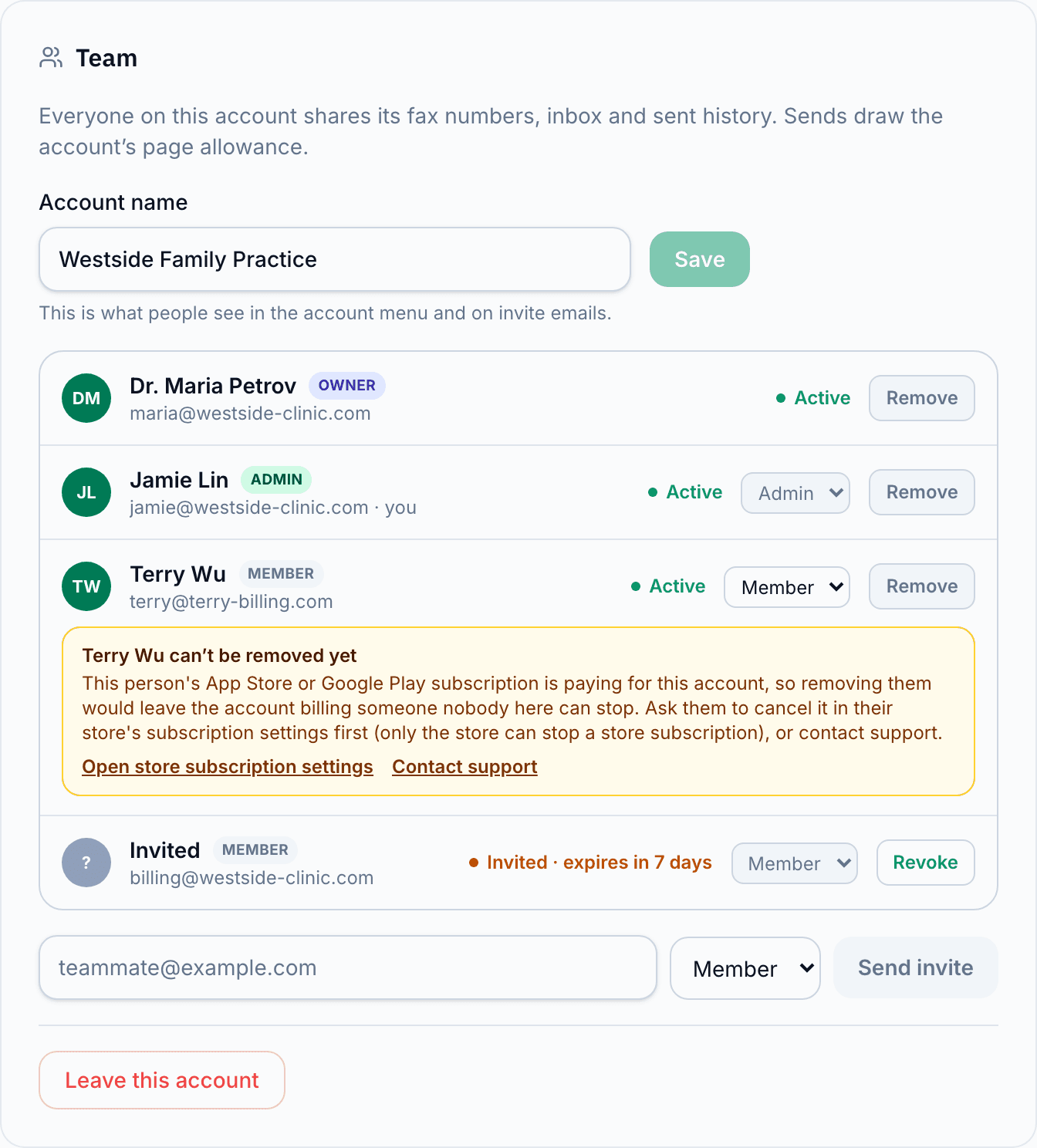
| Role | Send and receive | Invite and remove people | Buy pages, change plan, manage numbers | Hand over or delete the account |
|---|---|---|---|---|
| Member | Yes | No | No | No |
| Admin | Yes | Yes | Yes | No |
| Owner | Yes | Yes | Yes | Yes |
Every plan, including Free, holds as many people as you like. Adding the fifth person to your account changes your bill by zero. Details on invites, roles, and switching accounts: Teams and shared accounts.
Multiple fax numbers
One number comes with every paid plan. Add another for $3.99 a month and it appears on the same invoice, not a second subscription. Every number on the account receives into the same inbox and draws the same pool of pages.
A line per department
Billing, intake, and records can each publish a number without anyone maintaining a second account or a second login. What arrives is filed together.
Designate a primary number
Your primary number is the caller ID recipients see, so replies come back to you. Change which one is primary at any time.
Add/remove any time
Remove a number and the unused part of the period is credited against your next invoice. Faxes already received on it stay in the inbox.
More on holding several lines on one account: more than one fax number.
Cost per person
Everyone here charges for the second and third person. We do not. Cheapest published way to put 3 people on a plan that can receive:
| Service | Cheapest plan that seats 3 | Per month |
|---|---|---|
| FaxTerra Business | 200 pages, one numberPeople are not priced | $9.99 |
| mFax | SoloBilled annually | $31.00 |
| eFax | Business | $39.99 |
| RingCentral Fax | Fax 3000 (annual billing) | $68.97 |
Each vendor figure is the cheapest of their own plans that covers 3 people, read from their own plan card. Every FaxTerra plan, including Free, covers as many people as you like at no extra cost.
Versus a fax machine
A machine needs its own phone line at $30 to $50 a month, plus hardware, toner, paper, and the occasional repair. It receives only where it sits, sends only from where it sits, and cancelling it means selling or storing it. FaxTerra starts at $4.99 a month with nothing to buy, works from any device, and cancels with a button.
What’s included
Sign up with your email or Google account, pick a plan, and choose your number. A US or Canadian number is live in about two minutes.
Compare all plans on the pricing page. Only need to send? Send faxes free, no subscription needed.
Number porting
For a business the fax number is the expensive part of switching. It is printed on invoices you have already sent, on letterhead and business cards, in a state licence record, and in directory listings you cannot recall. Bring it to FaxTerra instead. Transferring a US or Canada number in is free on every paid plan, your existing service runs until the transfer completes, and nothing you have already published stops working.
Check whether your number can move before you subscribe, or read how fax number porting works.
Plans and add-ons
Every plan includes one fax number, sending and receiving, and an inbox with email alerts. Business and Pro keep received faxes for a year instead of 90 days.
Starter
$4.99/mo
50 pages a month
Unlimited people
Business
$9.99/mo
200 pages a month
Unlimited people
Pro
$29.99/mo
1,000 pages a month
Unlimited people
Add-ons
An extra fax number is $3.99 a month each. HIPAA compliance, which covers a signed Business Associate Agreement, per-document encryption, PHI-free notifications, and a six-year audit log, is $4.99 a month on any paid plan. Both appear on the invoice you already have. What a vendor review asks for, from the agreement template to the subprocessor list, is on the Trust Center.
See HIPAA complianceThe FaxTerra app for iPhone and Android sends, tracks, and reads incoming faxes on the same account.
Common Questions
Can my whole office use the same fax number?
Yes, on every plan, including Free. As many people as you like share one account: the same fax number, the same inbox, the same sent history, and the same monthly pages, with no per-user fees. Invite colleagues by email from Settings, and each person signs in as themselves. Members send and receive; admins can also invite people, buy pages, and manage the plan. Joining an office account changes nothing about a person's own FaxTerra account.
Can I have more than one fax number on the same account?
Yes. Every paid plan includes one, and you can add more for $3.99 a month each, up to twenty without talking to anyone. They all receive into the same inbox and draw the same pool of pages. On a monthly plan nothing is charged the day you add one; it appears on your next invoice.
Which number do my faxes go out from?
Whichever one you have set as primary, which is the caller ID the recipient sees and replies to. You can change which number is primary from your Numbers page at any time.
Does adding people or numbers change my page allowance?
No. Pages belong to the account and everyone draws on the same pool, so a quiet month on one number is not wasted. If you need more pages, that is the one thing the plan tiers differ on.
Do I need a fax machine to use this?
No. FaxTerra replaces the fax machine entirely. You get a real fax number that receives faxes, you are notified by email (and by push with the mobile app), then you view or download each one as a PDF from your inbox. When you need to send, upload a document from any device and fax it from your browser.
Can I put this number on my business cards and forms?
Yes. Your FaxTerra number is a real fax number in the US, Canada, the UK, or New Zealand. Give it out on business cards, include it on letterhead, put it on government forms. It works exactly like a traditional fax line, without the hardware.
Can I keep the fax number my business already uses?
Yes. Port your existing US or Canada fax number in, free with any paid plan, so the number already printed across your forms, invoices, and directory listings comes with you. Your current provider drives the transfer, so it takes from about a business day to a few weeks, and your existing fax service keeps working until it completes. Your number also stays yours: if you ever leave, you can port it back out, free.
How is this different from eFax?
eFax charges $18.99/month for one number and one person, and their Business tier prices additional users on top. FaxTerra is $4.99/month with as many people on the account as you like, and you can cancel online any time.
Can I cancel anytime?
Yes. No contracts, no cancellation fees, no phone calls. Cancel online from your Plans page any time; you keep your number until the end of the paid period, then it is released.
What if I only need to send faxes, not receive them?
You don't need a subscription to send. FaxTerra's free tier gives you 10 pages per month at no cost. Credit packs start at $1.99 for more. A subscription is only needed if you want your own fax number, to receive incoming faxes and get replies to faxes you send.
Businesses send with FaxTerra
Excellent · TrustScore 4.7This is by far the quickest, easiest way to send a fax anywhere. No hassle, easy signup with just your Google account, decent amount of pages per month, and you don't have to deal with advertisements or watermarks added to your documents. Highly recommended!
My fax number was created for me within less than two minutes. I could upload my SS-4 and cover sheet and fax them to the IRS in under five minutes. I also got a receipt confirmation in pdf format immediately after all this was done.
We only needed one service, a .pdf file faxed to a number, but it performed that service without issue. We knew that this was an often-busy fax number we were sending to, but it informed us that the attempt timed out, and after we chose 'retry', it went through without problem. Quick, easy, responsive, we had no issues with it.
Get your business fax number
$4.99 a month. 50 pages. As many people as you like. No contract.