How do I send a fax with FaxTerra?
A fax is a document sent to another fax machine over the phone network. FaxTerra does the calling for you — you pick a document and a number, and we deliver it. Here is exactly what to expect.
What you can send
You send a document from your computer or phone — no fax machine, no printer, no phone line of your own. FaxTerra accepts:
- PDF files
- Photos and images — JPG, PNG, HEIC (the format an iPhone takes, no need to convert it first), TIFF, GIF, BMP, and WebP
Multi-page TIFF files send all of their pages. You can attach more than one file to a single fax; they are combined and sent together as one transmission. Word documents and other file types are not sent directly — save or export them as a PDF first, then attach the PDF.
What you see in the preview is what is sent
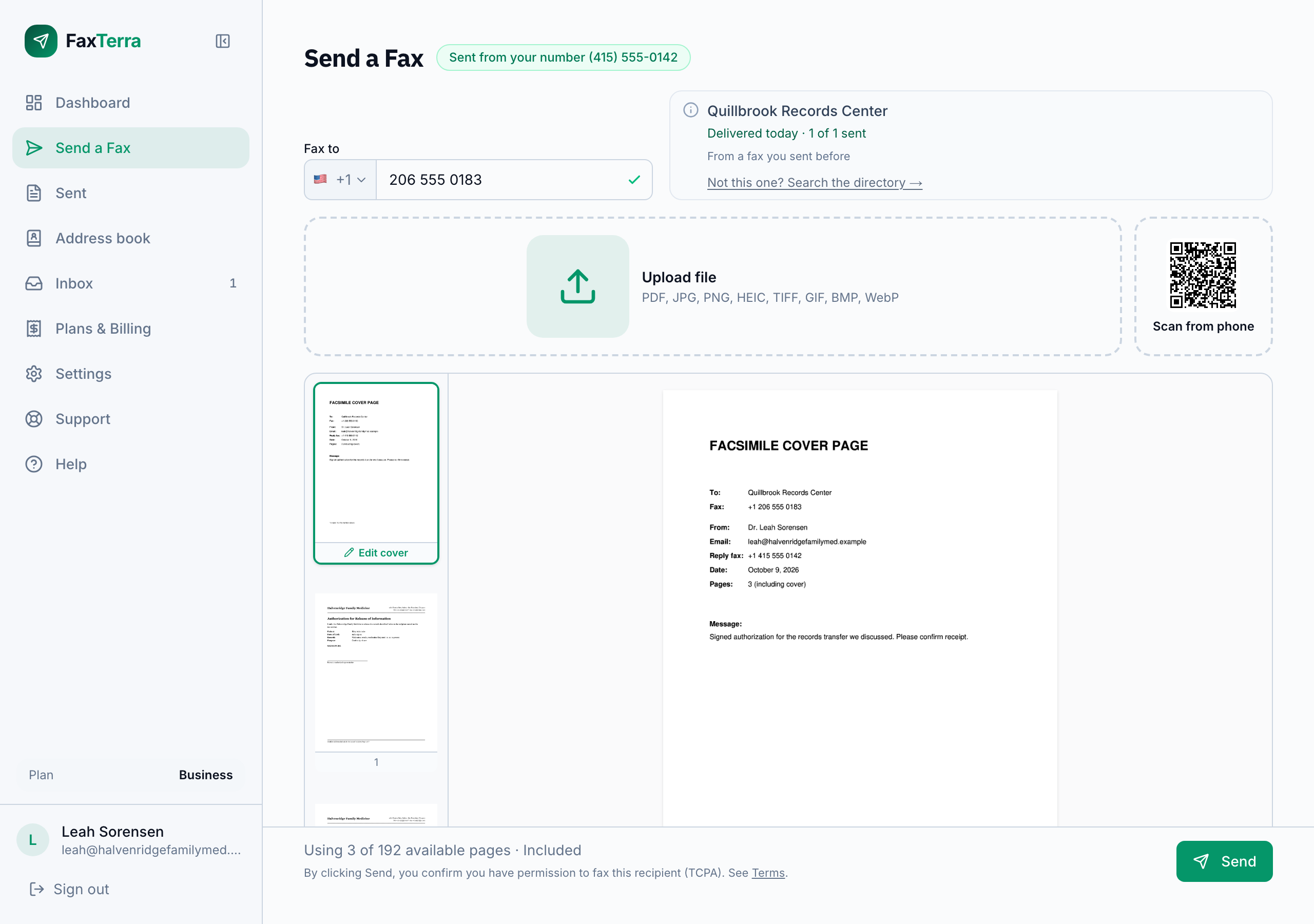
When you attach a document, FaxTerra lays it out as one tile per page, in the order the fax will send, black and white, one page at a time. The preview is not an approximation of the fax: those exact pages are what goes out, so a page that is hard to read here is worth fixing before you send (a darker scan, a larger font). Scans and photos are cleaned up for fax before sending, which is why a shadowed phone photo of a form usually arrives readable. Pages keep their shape: a sideways page is turned to fit the fax sheet, and a page of another size or shape is scaled to fit with white space around it rather than stretched or cropped. Select any page and the toolbar below the preview acts on just that one: flip a page that came in upside down, or remove a page you do not need, without touching the rest of the document. A cover page appears as a page tile too, so you see the whole fax the recipient gets.
To read the fax properly before you send it, open any page full screen. The whole document is there in send order, cover first, and you can move through it, zoom in on small print, and flip a page from the same view. Closing it leaves your document exactly as it was.
Choosing where it goes
Every fax goes to exactly one recipient fax number. As you type the number, FaxTerra helps you enter it correctly and, for common destinations like government offices, can recognize the number and confirm what it is. You do not have to find a number twice: every number you fax is kept in your address book, along with a directory of known destinations you can search. Sending the same document to two different places is two separate faxes. See which countries you can fax and, for a number abroad, what an international fax costs.
The optional cover page
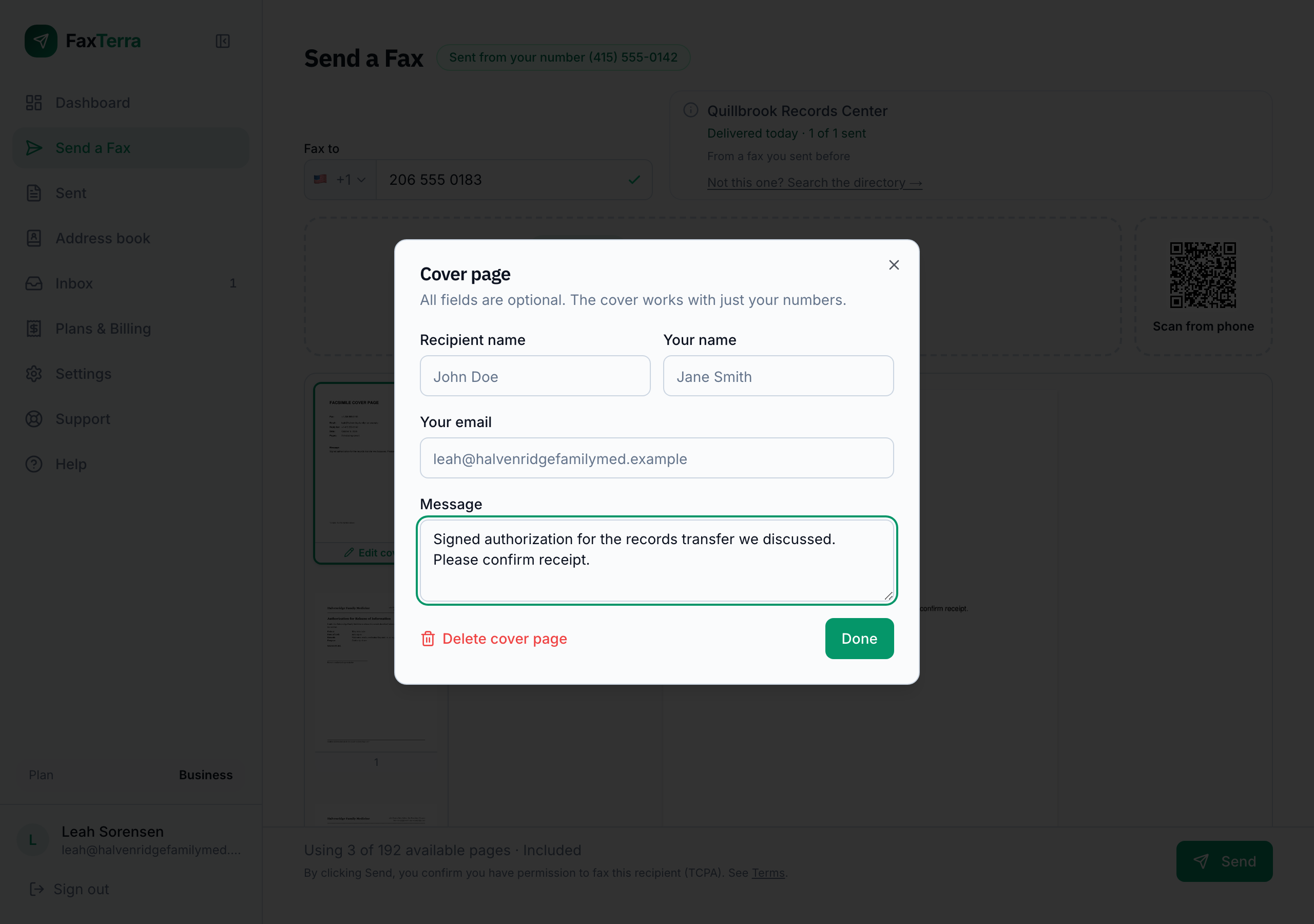
You can add a cover page with a short note to the recipient: their name, your name, an email address to reach you, and a message. It is optional. To add one, tap Add cover page under Upload file, or at the top of the page strip once you have pages. Tap the cover to change it, and Delete cover page in the editor removes it along with its message. If you add one, it counts as one page of the fax, the same as any other page.
How pages are counted
A "page" is a page of the fax that actually goes out. If you attach a three-page PDF and a one-page photo, that is four pages; adding a cover page makes it five. This matters because your allowance is measured in pages (see what you can fax for free and what the plans include). There is no limit on how many pages you can fax, and each file you upload can be up to 200 MB. Pages are the only thing that can turn one document into more than one fax. A large file never does. A document over 100 pages goes out as more than one fax, delivered in order, and you pay the same total either way. Because the count depends only on pages, the send form tells you how many before you commit.
What happens after you press send
Pressing send is all it takes — there is no separate confirmation step to hunt for. FaxTerra prepares your document, places the fax call, and shows you a live status while it works. You do not have to stay on the page: we email you the moment it is delivered, or if it could not get through. See how delivery and confirmations work.
Frequently Asked Questions
Do I need a fax machine or a phone line?
No. FaxTerra sends the fax for you over the internet. You only need a document and the recipient's fax number.
Can I send a fax from my phone?
Yes. You can send from any web browser, or from the FaxTerra mobile app. You can attach a photo taken on your phone directly — including the HEIC format iPhones use.
Where do I attach my document?
On the Send a Fax screen, once you are signed in. Below the fax number you are sending to there is an Upload file area: select it to choose files from your device, or drag files onto the page. On a computer there is also a Scan from phone option beside it, showing a code you scan with your phone. The Camera and Photos buttons that open there add what you take or pick to the fax you are building on the computer, so a paper document does not need a scanner. A free account is enough to reach the send screen.
Can I see the whole fax at full size before sending?
Yes. Open any page full screen and you get the entire fax, page by page in send order with the cover first. Zoom in to check small print, flip a page that came in upside down, then close it and send. Nothing about your document changes.
Why is the preview black and white?
Because that is what arrives. Fax machines transmit in black and white, so the preview shows your document the way the recipient's machine will print it. Your original file is not changed.
Can I adjust the contrast or quality of the fax?
There is no contrast, brightness, or quality setting to adjust: FaxTerra converts every document to black and white automatically the same way for everyone. If a page looks hard to read in the preview, a clearer original usually fixes it: better lighting on a photo, less glare, or a darker scan.
One page says its preview is unavailable. Will it still send?
Yes. That tile means the preview image could not be drawn, not that the page is broken. The page sends with the rest of the document.
Can I remove or flip just one page?
Yes. Tap a page to select it, then use the flip or remove control in the toolbar below the preview. Flip turns the page the right way up when a scan came in upside down; tapping it again puts it back. Remove works on the cover page too. If you want to start over instead, Clear all at the top of the page strip removes every page you uploaded in one step and leaves your cover page and recipient in place.
Can I send one fax to several numbers at once?
Each fax goes to one recipient number. To reach several recipients, send the document to each number separately.
Do you have an API?
Not today. FaxTerra is a web and mobile app: you send from the website or the iPhone and Android apps, and there is no public API for sending from your own software. If an API would matter for how you work, tell support what you would use it for; requests like that inform what we build.
Can I send a Word document?
Not directly. Save or export it as a PDF first — most word processors can do this from their Save As or Export menu — then attach the PDF.
How big a document can I send?
There is no page limit. Each file you upload can be up to 200 MB, and a document longer than 100 pages is sent as more than one fax automatically: they go out in order, each with its own "Part N of M" cover sheet, and you pay the same total page count either way. The send form tells you how many faxes it will be before you press send.
How long will my fax take to send?
A few minutes for a short document. Transmission runs at roughly a minute per page, so a 60-page document can take about an hour. You can close the page after you press send; FaxTerra emails you when it is delivered, or if it could not get through.
My upload fails or stalls. What should I do?
Uploading is the one part of sending that runs on your own connection, so a weak or busy network is the usual cause. A large file on a slow connection can sit at 100% for a while before it finishes, which looks stuck when it is still working. If the connection drops partway, FaxTerra retries it once on its own; after that, attach the file again. A stronger connection helps, as does closing other large downloads, and a very large file can go as two faxes instead of one. Each file you upload can be up to 200 MB.
Can I stop a fax that is already sending?
No. Once a fax is on its way to the recipient's machine it cannot be pulled back, the same as a fax sent from a machine in an office. What you can stop is what has not happened yet: a fax that failed and is retrying has a Stop trying button on its status page, and a long fax that stopped partway and is waiting on your choice can be cancelled there, in which case nothing more is sent and nothing is charged. See when a fax fails. Before you press send, the send form confirms who a recognized number belongs to, which is the moment to catch a wrong recipient.
Can I see my cover page again after I send?
Yes, for as long as the sent document is kept: 30 days on the free tier and Starter, and longer on Business and Pro (see documents and privacy). Open your Sent list, expand the fax, and choose View document: you see the pages the recipient received, the cover page first, and a fax with a cover is marked "incl. cover" in its page count. In the mobile app, the fax's detail page can also save the whole document, cover included, as a PDF. Once the document is removed, the record of the fax and its delivery confirmation stay but the cover page does not.